Tech-News
Cyber criminals are increasingly helping Russia and China target the US and allies, Microsoft says
Russia, China and Iran are increasingly relying on criminal networks to lead cyberespionage and hacking operations against adversaries like the U.S., according to a report on digital threats published Tuesday by Microsoft.
The growing collaboration between authoritarian governments and criminal hackers has alarmed national security officials and cybersecurity experts who say it represents the increasingly blurred lines between actions directed by Beijing or the Kremlin aimed at undermining rivals and the illicit activities of groups typically more interested in financial gain.
In one example, Microsoft's analysts found that a criminal hacking group with links to Iran infiltrated an Israeli dating site and then tried to sell or ransom the personal information it obtained. Microsoft concluded the hackers had two motives: to embarrass Israelis and make money.
Microsoft Copilot adds ChatGPT-like features
In another, investigators identified a Russian criminal network that infiltrated more than 50 electronic devices used by the Ukrainian military in June, apparently seeking access and information that could aid Russia's invasion of Ukraine. There was no obvious financial motive for the group, aside from any payment they may have received from Russia.
For nations like Russia, China, Iran and North Korea, which has its own ties to hacking groups, teaming up with cybercriminals offers a marriage of convenience with benefits for both sides. Governments can boost the volume and effectiveness of cyber activities without added cost. For the criminals, it offers new avenues for profit and the promise of government protection.
"We're seeing in each of these countries this trend towards combining nation-state and cybercriminal activities," said Tom Burt, Microsoft's vice president of customer security and trust.
So far there is no evidence suggesting that Russia, China or Iran are sharing resources with each other or working with the same criminal networks, Burt said. But he said the growing use of private cyber "mercenaries" shows how far America's adversaries will go to weaponize the internet.
Microsoft's report analyzed cyber threats between July 2023 and June 2024, looking at how criminals and foreign nations are using hacking, spear phishing, malware and other techniques to gain access and control over a target's system. The company says its customers face more than 600 million such incidents every day.
Russia focused much of its cyber operations on Ukraine, trying to gain entry into military and government systems and spreading disinformation designed to undermine support for the war among its allies.
Iran is accelerating cyber activity that appears meant to influence the US election, Microsoft says
Ukraine has responded with its own cyber efforts, including one last week that knocked some Russian state media outlets offline.
Networks tied to Russia, China and Iran have also targeted American voters, using fake websites and social media accounts to spread false and misleading claims about the 2024 election. Analysts at Microsoft agree with the assessment of U.S. intelligence officials who say Russia is targeting the campaign of Vice President Kamala Harris, while Iran is working to oppose former President Donald Trump.
Iran has also hacked into Trump's campaign and sought, unsuccessfully, to interest Democrats in the material. Federal officials have also accused Iran of covertly supporting American protests over the war in Gaza.
Russia and Iran will likely accelerate the pace of their cyber operations targeting the U.S. as election day approaches, Burt said.
China, meanwhile, has largely stayed out of the presidential race, focusing its disinformation on down-ballot races for Congress or state and local office. Microsoft found networks tied to Beijing also continue to target Taiwan and other countries in the region.
In response, a spokesperson for China's embassy in Washington said allegations that China partners with cybercriminals are groundless and accused the U.S. of spreading its own "disinformation about the so-called Chinese hacking threats."
In a statement, spokesperson Liu Pengyu said that "our position is consistent and clear. China firmly opposes and combats cyber attacks and cyber theft in all forms."
Russia and Iran have also rejected accusations that they're using cyber operations to target Americans. Messages left with representatives of those three nations and North Korea were not immediately returned on Monday.
Microsoft quits OpenAI board seat as antitrust scrutiny of artificial intelligence pacts intensifies
Efforts to disrupt foreign disinformation and cyber capabilities have escalated along with the threat, but the anonymous, porous nature of the internet sometimes undercuts the effectiveness of the response.
Federal authorities recently announced plans to seize hundreds of website domains used by Russia to spread election disinformation and to support efforts to hack former U.S. military and intelligence figures. But investigators at the Atlantic Council's Digital Forensic Research Lab found that sites seized by the government can easily and quickly be replaced.
Within one day of the Department of Justice seizing several domains in September, for example, researchers spotted 12 new websites created to take their place. One month later, they continue to operate.
1 year ago
New AI scam targets Gmail users with fake account recovery requests
A sophisticated AI-driven scam is now targeting Gmail users, aiming to steal personal data by tricking individuals into approving fraudulent account recovery requests.
The scam, which has raised concerns among cybersecurity experts, uses professional-sounding AI voices and cleverly spoofed emails to gain unauthorised access to users' Gmail accounts.
Deceptive Tactics Uncovered
Sam Mitrovic, an IT consultant and tech blogger, recently shared his experience of this new scam in a detailed blog post. The scam typically begins when the user receives an unexpected Gmail account recovery request notification, which appears legitimate at first glance.
However, the recovery request is entirely fake and usually originates from a different country, as Mitrovic discovered when his request came from the United States.
Declining the recovery request, as Mitrovic did, doesn’t stop the scam. About 40 minutes later, users receive a phone call from a number that appears to be from Google.
Microsoft quits OpenAI board seat as antitrust scrutiny of artificial intelligence pacts intensifies
The call is highly convincing, with a professional-sounding, polite voice claiming to be from Google, warning the user of suspicious activity on their account. The scammer then raises alarm by asking if the user has logged into their Gmail from a foreign location.
Further complicating matters, the number displayed on the caller ID may appear to be from an official Google office.
The scammer uses this to convince the victim that someone has accessed sensitive information from their account and urges them to approve the recovery request in order to secure their data. If the victim complies, the scammers gain full access to the Gmail account, putting personal information at serious risk.
How to Stay Safe
Mitrovic stresses the importance of vigilance when dealing with unexpected account recovery requests or suspicious phone calls. He outlines several steps Gmail users can take to protect themselves from falling victim to this clever AI-based scam:
Do Not Approve Unrequested Recovery Requests: If you receive a recovery request that you didn’t initiate, do not approve it. This is a strong sign that your account is being targeted by scammers.
Verify Calls Claiming to be from Google: Google typically does not call users directly, except in cases related to business services. If you receive a suspicious call, it’s best to hang up and verify the phone number independently before engaging further.
UN adopts Chinese resolution with US support on closing the gap in access to artificial intelligence
Check Emails Carefully: Spoofed emails are designed to look authentic but often contain small giveaways, such as discrepancies in the “To” field or domain name. Be vigilant and inspect email details thoroughly before responding.
Review Security Activity Regularly: Users should regularly check their Gmail security settings for unfamiliar logins. This can be done by going to the Gmail “Security” tab and reviewing recent activity for any signs of unauthorised access.
Inspect Email Headers: For tech-savvy users, reviewing the original email headers can help confirm whether an email was truly sent from a legitimate Google server or a spoofed one.
This new scam serves as a reminder for Gmail users to stay alert and cautious when dealing with unusual activity on their accounts. While the use of AI has made these scams more sophisticated, following these protective measures can significantly reduce the risk of falling victim to such attacks.
By double-checking all recovery requests, phone calls, and emails, users can safeguard their personal data from scammers exploiting AI technologies to deceive the unsuspecting.
Source: With inputs from agencies
1 year ago

Elon Musk unveils Tesla's 'Cybercab,' plans to bring autonomous driving tech to other models in 2025
Tesla unveiled its long-awaited robotaxi at a Hollywood studio Thursday night, though fans of the electric vehicle maker will have to wait until at least 2026 before they are available.
CEO Elon Musk pulled up to a stage at the Warner Bros. studio lot in one of the company's “Cybercabs," telling the crowd that the sleek, AI-powered vehicles don't have steering wheels or pedals. He also expressed confidence in the progress the company has made on autonomous driving technology that makes it possible for vehicles to drive without human intervention.
Tesla began selling the software, which is called “Full Self-Driving,” nine years ago. But there are doubts about its reliability.
“We’ll move from supervised Full Self-Driving to unsupervised Full Self-Driving. where you can fall asleep and wake up at your destination,” he said. "It’s going to be a glorious future.”
Tesla expects the Cybercabs to cost under $30,000, Musk said. He estimated that the vehicles would become available in 2026, then added “before 2027.”
The company also expects to make the Full Self-Driving technology available on its popular Model 3 and Model Y vehicles in Texas and California next year.
Tesla is unveiling its long-awaited robotaxi amid doubts about the technology it runs on
“If they’re going to eventually get to robotaxis, they first need to have success with the unsupervised FSD at the current lineup,” said Seth Goldstein, equity strategist at Morningstar Research. “Tonight’s event showed that they're ready to take that step forward.”
When Tesla will actually take that step, however, has led to more than a little anxiety for investors who see other automakers deploying similar technology right now. Shares of Tesla Inc. tumbled almost 7% before the opening bell Friday.
Waymo, the autonomous vehicle unit of Alphabet Inc., is carrying passengers in vehicles without human safety drivers in Phoenix and other areas. General Motors’ Cruise self-driving unit had been running robotaxis in San Francisco until a crash last year involving one of its vehicles.
Also, Aurora Innovation said it will start hauling freight in fully autonomous semis on Texas freeways by year’s end. Another autonomous semi company, Gatik, plans to haul freight autonomously by the end of 2025.
“Tesla yet again claimed it is a year or two away from actual automated driving -- just as the company has been claiming for a decade. Indeed, Tesla’s whole event had a 2014 vibe, except that in 2014 there were no automated vehicles actually deployed on public roads,” Bryant Walker Smith, a University of South Carolina law professor who studies automated vehicles, told The Associated Press in an email. “Now there are real AVs carrying real people on real roads, but none of those vehicles are Teslas. Tonight did not change this reality; it only made the irony more glaring.”
Tesla had 20 or so Cybercabs on hand and offered event attendees the opportunity to take rides inside the movie studio lot — not on Los Angeles' roads.
At the presentation, which was dubbed “We, Robot” and was streamed live on Tesla’s website and X, Musk also revealed a sleek minibus-looking vehicle that, like the Cybercab, would be self-driving and can carry up to 20 passengers.
5th recall for Tesla Cybertruck within a year, the latest due to rearview display
The company also trotted out several of its black and white Optimus humanoid robots, which walked a few feet from the attendees before showing off dance moves in a futuristic-looking gazebo.
Musk estimated that the robots would cost between $28,000-$30,000 and would be able to babysit, mow lawns, fetch groceries, among other tasks.
“Whatever you can think of, it will do,” he said.
The unveiling of the Cybercab comes as Musk tries to persuade investors that his company is more about artificial intelligence and robotics as it labors to sell its core products, an aging lineup of electric vehicles.
Tesla’s model lineup is struggling and isn’t likely to be refreshed until late next year at the earliest, TD Cowen analyst Jeff Osborne wrote in a research note last week.
Osborne also noted that, in TD Cowen’s view, the “politicization of Elon” is tarnishing the Tesla brand among Democrat buyers in the U.S.
Musk has endorsed Republican presidential candidate Donald Trump and has pushed many conservative causes. Last weekend he joined Trump at a Pennsylvania rally.
Musk has been saying for more than five years that a fleet of robotaxis is near, allowing Tesla owners to make money by having their cars carry passengers while they’re not in use by the owners.
Future of Elon Musk and Tesla are on the line as shareholders vote on massive pay package
But he has acknowledged that past predictions for the use of autonomous driving proved too optimistic. In 2019, he promised the fleet of autonomous vehicles by the end of 2020.
The announcement comes as U.S. safety regulators are investigating Full Self Driving and Autopilot based on evidence that it has a weak system for making sure human drivers pay attention.
In addition, the U.S. National Highway Traffic Safety Administration forced Tesla to recall Full Self-Driving in February because it allowed speeding and violated other traffic laws, especially near intersections. Tesla was to fix the problems with an online software update.
Last April in Snohomish County, Washington, near Seattle, a Tesla using Full Self-Driving hit and killed a motorcyclist, authorities said. The Tesla driver told authorities that he was using the system while looking at his phone when the car rear-ended the motorcyclist. The motorcyclist was pronounced dead at the scene, authorities said.
NHTSA says it’s evaluating information on the fatal crash from Tesla and law enforcement officials.
The Justice Department also has sought information from Tesla about Full Self-Driving and Autopilot, as well as other items.
1 year ago

AI is having its Nobel moment. Do scientists need the tech industry to sustain it?
Hours after the artificial intelligence pioneer Geoffrey Hinton won a Nobel Prize in physics, he drove a rented car to Google's California headquarters to celebrate.
Hinton doesn't work at Google anymore. Nor did the longtime professor at the University of Toronto do his pioneering research at the tech giant.
But his impromptu party reflected AI's moment as a commercial blockbuster that has also reached the pinnacles of scientific recognition.
That was Tuesday. Then, early Wednesday, two employees of Google's AI division won a Nobel Prize in chemistry for using AI to predict and design novel proteins.
“This is really a testament to the power of computer science and artificial intelligence,” said Jeanette Wing, a professor of computer science at Columbia University.
Asked about the historic back-to-back science awards for AI work in an email Wednesday, Hinton said only: “Neural networks are the future.”
Nobel Peace Prize awarded to Japanese organization of atomic bombing survivors Nihon Hidankyo
It didn't always seem that way for researchers who decades ago experimented with interconnected computer nodes inspired by neurons in the human brain. Hinton shares this year's physics Nobel with another scientist, John Hopfield, for helping develop those building blocks of machine learning.
Neural network advances came from “basic, curiosity-driven research,” Hinton said at a press conference after his win. “Not out of throwing money at applied problems, but actually letting scientists follow their curiosity to try and understand things.”
Such work started well before Google existed. But a bountiful tech industry has now made it easier for AI scientists to pursue their ideas even as it has challenged them with new ethical questions about the societal impacts of their work.
One reason why the current wave of AI research is so closely tied to the tech industry is that only a handful of corporations have the resources to build the most powerful AI systems.
“These discoveries and this capability could not happen without humongous computational power and humongous amounts of digital data,” Wing said. “There are very few companies — tech companies — that have that kind of computational power. Google is one. Microsoft is another.”
The chemistry Nobel Prize awarded Wednesday went to Demis Hassabis and John Jumper of Google’s London-based DeepMind laboratory along with researcher David Baker at the University of Washington for work that could help discover new medicines.
Hassabis, the CEO and co-founder of DeepMind, which Google acquired in 2014, told the AP in an interview Wednesday his dream was to model his research laboratory on the “incredible storied history” of Bell Labs. Started in 1925, the New Jersey-based industrial lab was the workplace of multiple Nobel-winning scientists over several decades who helped develop modern computing and telecommunications.
“I wanted to recreate a modern day industrial research lab that really did cutting-edge research,” Hassabis said. “But of course, that needs a lot of patience and a lot of support. We’ve had that from Google and it’s been amazing.”
Hinton joined Google late in his career and quit last year so he could talk more freely about his concerns about AI’s dangers, particularly what happens if humans lose control of machines that become smarter than us. But he stops short of criticizing his former employer.
Hinton, 76, said he was staying in a cheap hotel in Palo Alto, California when the Nobel committee woke him up with a phone call early Tuesday morning, leading him to cancel a medical appointment scheduled for later that day.
By the time the sleep-deprived scientist reached the Google campus in nearby Mountain View, he “seemed pretty lively and not very tired at all” as colleagues popped bottles of champagne, said computer scientist Richard Zemel, a former doctoral student of Hinton’s who joined him at the Google party Tuesday.
“Obviously there are these big companies now that are trying to cash in on all the commercial success and that is exciting,” said Zemel, now a Columbia professor.
But Zemel said what’s more important to Hinton and his closest colleagues has been what the Nobel recognition means to the fundamental research they spent decades trying to advance.
Guests included Google executives and another former Hinton student, Ilya Sutskever, a co-founder and former chief scientist and board member at ChatGPT maker OpenAI. Sutskever helped lead a group of board members who briefly ousted OpenAI CEO Sam Altman last year in turmoil that has symbolized the industry's conflicts.
An hour before the party, Hinton used his Nobel bully pulpit to throw shade at OpenAI during opening remarks at a virtual press conference organized by the University of Toronto in which he thanked former mentors and students.
“I’m particularly proud of the fact that one of my students fired Sam Altman,” Hinton said.
Asked to elaborate, Hinton said OpenAI started with a primary objective to develop better-than-human artificial general intelligence “and ensure that it was safe.”
"And over time, it turned out that Sam Altman was much less concerned with safety than with profits. And I think that’s unfortunate,” Hinton said.
In response, OpenAI said in a statement that it is “proud of delivering the most capable and safest AI systems” and that they “safely serve hundreds of millions of people each week.”
Conflicts are likely to persist in a field where building even a relatively modest AI system requires resources “well beyond those of your typical research university,” said Michael Kearns, a professor of computer science at the University of Pennsylvania.
But Kearns, who sits on the committee that picks the winners of computer science's top prize — the Turing Award — said this week marks a “great victory for interdisciplinary research” that was decades in the making.
Hinton is only the second person to win both a Nobel and Turing. The first, Turing-winning political scientist Herbert Simon, started working on what he called “computer simulation of human cognition” in the 1950s and won the Nobel economics prize in 1978 for his study of organizational decision-making.
Wing, who met Simon in her early career, said scientists are still just at the tip of finding ways to apply computing's most powerful capabilities to other fields.
“We’re just at the beginning in terms of scientific discovery using AI,” she said.
1 year ago
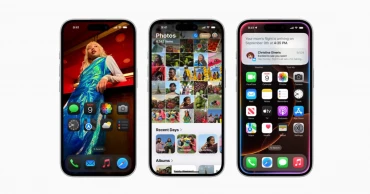
Apple’s iOS 18: Top Features, Supported Devices, and Key Updates You Need to Know
Apple’s iOS 18 has arrived, setting a new benchmark for mobile operating systems with cutting-edge features and performance enhancements. Released in September 2024, iOS 18 delivers a host of improvements designed to enhance user experience, from new personalization options to enhanced security measures. Here's a breakdown of everything you need to know about iOS 18, including its standout features, device compatibility, and potential drawbacks.
New Features of Apple’s iOS 18
.
Apple Intelligence (Coming with iOS 18.1)
One of the most anticipated features, Apple Intelligence, will debut in iOS 18.1, specifically for the iPhone 15 Pro, iPhone 15 Pro Max, and iPhone 16. Apple Intelligence includes cutting-edge AI tools such as smarter Siri, text summarisation, writing assistance, and generative image creation.
While it is not yet part of the core iOS 18 release, users can experience it via the iOS 18.1 beta. This AI-driven toolset is designed to streamline tasks, make Siri more proactive, and enable users to create visuals effortlessly.
Redesigned Photos App
With iOS 18, the Photos app received its biggest-ever redesign. Apple has unified the layout into a single view combining a photo grid and a date grid, making it easier to navigate and locate photos.
Users can also filter photos by categories like screenshots or groups, significantly simplifying organization. Additionally, iOS 18 introduces a new ‘Recovered’ album, which stores photos or videos not in the main gallery and reduces risks of database corruption or issues with third-party apps.
Read more: Apple iPhone 16 Pro Max Review: The Biggest and The Best of 2024
Advanced Home Screen Customisation
iOS 18 takes customisation to the next level with significant upgrades to the Home Screen. For the first time, users can rearrange app icons and widgets to the bottom or sides of the screen, offering more flexibility for personal layouts.
The dark mode is now available for app icons, and users can apply color tints to match or complement their wallpapers. This enhanced customisation allows for a more personalized and visually pleasing experience.
Control Center Upgrades
Apple has also made significant improvements to the Control Center in iOS 18. Users can now group controls into distinct function sets, such as Media and Home, and resize Control Center widgets to fit their preferences. For the first time, users can also decide which Control Center widgets will appear on the Lock Screen, adding more functionality at a glance.
Messages Upgrades
iOS 18 enhances the Messages app with several exciting new features. Users can now react to messages using any emoji, offering more expressive ways to communicate. Apple has also introduced text formatting options, allowing users to bold, italicize, underline, or strikethrough text.
In addition, iOS 18 brings support for the RCS messaging standard, which provides a richer experience when communicating with non-Apple users. Another useful feature is the ability to schedule messages and make it easier to send important texts at the right time.
Read more: Apple iPhone 16 Pro Review: Does a Bigger Phone Come with Better Features?
New Passwords App
iOS 18 introduces a new app called Passwords, designed to be a secure vault for all your passwords, passkeys, and verification codes. The app not only stores this information but also alerts you if any of your passwords are weak or compromised in a data breach. As expected, all data is protected by end-to-end encryption, and the app can be locked using Face ID or Touch ID.
Wallet Upgrades
The Wallet app in iOS 18 comes with the new "tap to cash" feature, which simplifies peer-to-peer payments. This makes paying friends or splitting bills even easier. Dynamic event tickets also make their debut in the Wallet app which provide users with more interactive ticket designs and additional event information.
Messages via Satellite
For users with compatible iPhones, iOS 18 expands satellite capabilities, enabling them to send messages when Wi-Fi and cellular networks are unavailable. This feature is especially useful in remote areas and also adds a layer of communication safety for travelers and adventurers.
ID-Authenticated App Locks
A significant privacy upgrade in iOS 18 is the ability to lock any app, not just banking or Notes apps, behind Face ID or Touch ID. Users can also hide apps in a new Hidden Apps folder which provides more control over their privacy and security.
Math in Any Text Field
iOS 18 introduces a nifty feature that allows users to perform mathematical calculations directly in any text field. This small but powerful update means that you will not need to open the Calculator app to solve basic math problems—it can be done seamlessly while typing.
Read more: Apple iPhone 16 Review: Can It Set New Standards for the Brand?
Power Reserve with Time Display
The Power Reserve feature has been upgraded in iOS 18. Previously, Power Reserve allowed access to key features like cards and Find My iPhone when the battery was almost depleted. Now, it also displays the time, offering another useful function when your phone is low on power.
Shoot Videos without Pausing Audio
With iOS 18, users can record videos without interrupting any background audio, such as music or podcasts. This feature, though small, is a welcome change for those who enjoy capturing moments while listening to their favorite tunes.
Compatible Devices
iPhone ModelsiPhone SE (2nd generation)iPhone SE (3rd generation)iPhone XRiPhone XSiPhone XS MaxiPhone 11 seriesiPhone 12 seriesiPhone 13 seriesiPhone 14 seriesiPhone 15 seriesiPhone 16 seriesiPad ModelsiPad Pro (M4)iPad Pro 12.9″ (3rd generation and later)iPad Pro 11″ (1st generation and later)iPad Air (M2) iPad Air (3rd generation and later)iPad (7th generation and later)iPad mini (5th generation and later).
Read more: Top 7 Smartphones Coming in October 2024
Limitations of Apple’s iOS 18
Delayed Apple Intelligence Features
One significant limitation of iOS 18 is the absence of Apple Intelligence features at launch. These advanced AI capabilities, including enhanced Siri and text summarisation, will not be available until iOS 18.1. Users excited about these smart features will need to wait until a later update to fully experience the benefits of Apple’s AI integration.
Bugs and Performance Issues
Early adopters of iOS 18 have reported issues such as performance drops, particularly on older devices like the iPhone 12. Bugs include touchscreen unresponsiveness and camera freezing during specific tasks, like shooting videos in macro mode. As with many major updates, these issues are common in initial releases and are likely to be addressed in future patches.
Incompatibility with Older Devices
iOS 18 has also dropped support for several older iPads and iPhones, including models like the iPad Pro 10.5-inch (2017) and iPhone XS Max, meaning not all users will be able to access the new software.
Verdict
The Apple iOS 18 is a robust update packed with features that enhance customisation, privacy, and communication. While its initial release lacks the full power of Apple Intelligence, it is expected that the upcoming iOS 18.1 will address those issues. Early bugs and limited device compatibility may deter some users, but overall, the improvements in Photos, Messages, and Control Center make the iOS 18 a valuable upgrade, particularly for newer devices. Waiting for patches is advised for smoother performance.
Read more: What’s New in Microsoft Office 2024: Key Features, AI Integrations, and Installation Guide
1 year ago
Google loses final EU court appeal against 2.4 billion euro fine in antitrust shopping case
Google lost its final legal challenge on Tuesday against a European Union penalty for giving its own shopping recommendations an illegal advantage over rivals in search results, ending a long-running antitrust case that came with a whopping fine.
The European Union’s Court of Justice upheld a lower court’s decision, rejecting the company’s appeal against the 2.4 billion euro ($2.7 billion) penalty from the European Commission, the 27-nation bloc’s top antitrust enforcer.
"By today’s judgment, the Court of Justice dismisses the appeal and thus upholds the judgment of the General Court," the court said in a press release summarizing its decision.
Read: Former YouTube CEO and longtime Google executive Susan Wojcicki has died at 56
The commission punished the Silicon Valley giant in 2017 for unfairly directing visitors to its own Google Shopping service to the detriment of competitors. It was one of three multibillion-euro fines that the commission imposed on Google in the previous decade as Brussels started ramping up its crackdown on the tech industry.
“We are disappointed with the decision of the Court, which relates to a very specific set of facts,” Google said in a brief statement.
The company said it made changes in 2017 to comply with the commission’s decision requiring it to treat competitors equally. It started holding auctions for shopping search listings that it would bid for alongside other comparison shopping services.
“Our approach has worked successfully for more than seven years, generating billions of clicks for more than 800 comparison shopping services,” Google said.
Read: US considers asking court to break up Google as it weighs remedies in the antitrust case
At the same time, the company appealed the decision to the courts. But the EU General Court, the tribunal's lower section, rejected its challenge in 2021 and the Court of Justice’s adviser later recommended rejecting the appeal.
European consumer group BEUC hailed the court's decision, saying it shows how the bloc's competition law “remains highly relevant" in digital markets.
"Google harmed millions of European consumers by ensuring that rival comparison shopping services were virtually invisible," director general Agustín Reyna said. “Google’s illegal practices prevented consumers from accessing potentially cheaper prices and useful product information from rival comparison shopping services on all sorts of products, from clothes to washing machines.”
Google is still appealing the other two EU antitrust penalties, which involved its Android mobile operating system and AdSense advertising platform. The company was dealt a setback in the Android case when the EU General Court upheld the commission's 4.125 billion euro fine in a 2022 decision. Its initial appeal against a 1.49 billion euro fine in the AdSense case has yet to be decided.
Those three cases foreshadowed expanded efforts by regulators worldwide to crack down on the tech industry. The EU has since opened more investigations into Big Tech companies and drafted new laws to clean up social media platforms and regulate artificial intelligence.
Read more: Google rolls out features to prevent thieves from accessing stolen devices
Google is now facing particular pressure over its lucrative digital advertising business. In a federal antitrust trial that began Monday, the U.S. Department of Justice is alleging the company holds a monopoly in the “ad tech” industry.
British competition regulators accused Google last week of abusing its dominance in ad tech while the EU is carrying out its own investigation.
1 year ago

What’s New in Microsoft Office 2024: Key Features, AI Integrations, and Installation Guide
Microsoft Office 2024 is here, continuing the legacy of its iconic productivity suite with significant upgrades and new tools. With enhanced features across Word, Excel, and PowerPoint, improved collaboration capabilities, and cutting-edge AI integrations, this latest version is designed to boost productivity for individuals and teams alike. In this article, we’ll cover everything you need to know about Microsoft Office 2024, including installation steps, key features, potential limitations, and our overall verdict on this highly anticipated update.
How to Install Microsoft Office 2024
Microsoft Office 2024 is not available for free, but Microsoft provides a legal way to try it through the Microsoft Office 2024 LTSC (Long-Term Servicing Channel) preview. This preview version allows users to explore Office 2024’s features temporarily before committing to a purchase or a Microsoft 365 subscription. While Microsoft 365 offers continuous updates, cloud storage, and collaboration tools, the LTSC preview is ideal for those who want to test the software without an immediate financial commitment.
Read more: How to Detect an AI-generated Image
Here’s how to install Microsoft Office 2024 LTSC preview
.
Step 1: Uninstall Previous Versions
Before installing Office 2024, you need to uninstall any older versions of Microsoft Office. Open Settings on Windows, navigate to Apps → Apps & Features and search for Microsoft Office. Then, select the installed version and click Uninstall. Follow the prompts to complete the process.
Step 2: Download the Office Deployment Tool
Next, you will need to download the Office Deployment Tool. Visit the Microsoft website, download the tool, and save it in a folder named Office 2024 on your desktop. Delete any existing XML files from the folder to avoid conflicts.
Step 3: Configure Installation
Create a configuration XML file for your installation. Visit the LTSC Preview Installation Page, copy the XML code, and paste it into Notepad. You can customise it according to your preferences and save the file as configuration.xml in your Office 2024 folder.
Read more: 10 Best eBook Reader Apps for Android, iOS in 2024
Step 4: Install Office 2024
Open Command Prompt, navigate to the Office 2024 folder, and run this command:
setup /configure configuration.xml.
The installation will begin automatically.
Step 5: Activate Office 2024
After installation, activate Office using the product key from the LTSC Preview page.
This LTSC preview is temporary, and you will need to switch to a paid version eventually, but it is an excellent way to experience Office 2024 firsthand.
Key Features of Microsoft Office 2024
.
AI-Powered Copilot Assistance
One of the most significant additions in Office 2024 is the AI-powered Copilot, integrated into applications like Word, Excel, and PowerPoint. Copilot helps automate repetitive tasks, drafts content, analyses data trends, and offers smart recommendations, making work more efficient and intuitive.
Read more: Best Free Personal Safety Android, iOS Apps for Women in 2024
New and Improved User Interface
Office 2024 comes with a modernised design that follows Fluent Design principles, offering a more intuitive and consistent experience across all apps. The interface is sleek, minimalistic, and optimised for Windows 11, with new custom themes, toolbars, and Dark Mode improvements that enhance usability across devices.
Dynamic Arrays and Charting in Excel
Excel 2024 introduces Dynamic Arrays, which allow you to reference variable-length datasets within charts. This feature automatically updates charts as data recalculates, providing a more dynamic and accurate visual representation of your data. Fourteen new Text and Array functions simplify data manipulation.
Enhanced Collaboration with Loop Integration
The new Microsoft Loop integration in Office 2024 boosts real-time collaboration. Loop components can be embedded across different Office apps, allowing live updates and seamless teamwork. Whether you are in Word or Excel, changes made by your team appear instantly, improving efficiency in collaborative environments.
Read more: How to Activate Earthquake Alerts on Android, iOS Phones
Insert Pictures from Mobile Devices
A handy new feature in Office 2024 allows you to insert pictures directly from your Android phone into Word, Excel, and PowerPoint documents. This streamlines the process of adding visuals to your files, saving time and effort.
Present with Cameo in PowerPoint
PowerPoint 2024 introduces Cameo, a feature that lets you integrate your live camera feed into slides. This enables presenters to engage their audience more personally, using effects and transitions on their video feed to match the presentation’s style.
Word Session Recovery
Session recovery has been improved in Word 2024, allowing users to recover unsaved documents when the app closes unexpectedly. This ensures that your progress is not lost, even if the application crashes before saving.
Read more: Best Video Editing Apps for Android, IOS in 2024
Advanced Accessibility Tools
Office 2024 places a stronger emphasis on accessibility. The Accessibility Ribbon provides enhanced tools across Word, Excel, PowerPoint, and Outlook to ensure your content is accessible to all users. Features like real-time feedback from the Accessibility Checker allow users to create inclusive documents effortlessly.
OpenDocument Format (ODF) 1.4 Support
Office 2024 includes support for OpenDocument Format (ODF) 1.4, which adds compatibility for more modern document features. It includes tables within shapes and new accessibility attributes.
Limitations of Microsoft Office 2024
.
No Feature Updates
Microsoft Office 2024 offers a one-time purchase model, meaning that after the initial release, users will only receive security updates and bug fixes. Unlike Microsoft 365, Office 2024 will not receive new features, potentially leaving users with outdated software over time.
Read more: Water Battery: What's Special About It
No Cloud Storage or Collaboration Tools
Office 2024 does not include OneDrive cloud storage or any advanced collaboration tools like Microsoft Teams. This lack of cloud services limits remote access, team collaboration, and file sharing, making it less suitable for modern, cloud-based workflows.
Higher Initial Cost
While Office 2024 eliminates subscription fees, it comes with a higher upfront cost. This can be expensive compared to spreading payments over time with Microsoft 365. Additionally, there is no option to upgrade to newer versions without purchasing another license.
Limited Cross-Platform Compatibility
Office 2024 is primarily designed for use on one device. Users will need to buy separate licenses for Windows and Mac, and the software lacks the flexibility of Microsoft 365, which supports multiple devices, including mobile platforms.
Read more: Best Text-to-Speech Software in 2024
Reduced Support Lifecycle
Office 2024 will be supported for five years, after which no further updates, including security patches, will be provided. This limits the software’s long-term viability compared to subscription-based services like Microsoft 365, which receives continuous updates.
Verdict
Microsoft Office 2024 is a powerful update packed with advanced features, such as AI-driven Copilot and expanded collaboration via Loop, making it a highly productive tool for users across platforms. Its revamped UI and improved cloud integration provide a seamless experience, especially for those working on multiple devices.
However, the higher upfront cost and lack of ongoing feature updates may deter some, especially with the more modern and feature-rich Microsoft 365 subscription available. For businesses or individuals seeking robust tools without a subscription, Office 2024 remains a solid, versatile option.
Read more: Best Free Bangladeshi Online Doctor Apps for Android, iOS in 2024
1 year ago

Google rolls out features to prevent thieves from accessing stolen devices
In a move aimed at bolstering user security, Google has introduced a trio of innovative features designed to make it increasingly difficult for thieves to access stolen Android devices.
These new tools, namely Theft Detection Lock, Offline Device Lock, and Remote Lock, are set to enhance the protection of personal data, providing users with greater peace of mind in the unfortunate event of theft.
Theft Detection Lock: An Automatic Safeguard
The standout among these features is Theft Detection Lock, which uses machine learning technology to identify suspicious movement patterns indicative of theft.
Microsoft Copilot adds ChatGPT-like features
If a thief physically snatches a device—whether while the user is walking or cycling—the phone can recognise this sudden movement and promptly lock itself.
This intelligent system continuously monitors how the device is handled, with the ability to detect rapid acceleration when it is taken from a user’s hand. In such scenarios, the phone will immediately lock, preventing the thief from accessing apps, data, or personal information.
The swift activation of this lock is a significant advantage, as it makes it exceedingly difficult for the thief to use the device further.
Offline Device Lock: Further Protection
In addition to Theft Detection Lock, Google has also rolled out the Offline Device Lock feature. This safeguard triggers the locking mechanism if the device is disconnected from the internet for an extended period, effectively thwarting any attempts by a thief to disable tracking or remote unlocking features.
Remote Lock: An Extra Layer of Security
The Remote Lock feature allows users to lock their phones remotely via their phone number, which is particularly beneficial for those unable to access their Google account or "Find My Device" function. This added layer of security ensures users have multiple options for securing their data in the event of theft.
Meta unveils cheaper VR headset, AI updates and shows off prototype for holographic AR glasses
Gradual Rollout Across the US
Currently, these features are being gradually rolled out to users in the United States. Reports indicate that availability varies by device; while some users have gained access to Theft Detection Lock and Offline Device Lock, others, particularly those with certain Pixel models, may only see Remote Lock.
The rollout follows beta testing in Brazil earlier this year and is expected to expand to a wider range of Android devices in the near future.
Users of devices like the Xiaomi 14T Pro and Google Pixel are likely to benefit from these new security enhancements through upcoming software updates.
These innovations represent a significant advancement in safeguarding personal data against the increasing threat of smartphone theft, offering users a crucial sense of security in an unpredictable world.
1 year ago
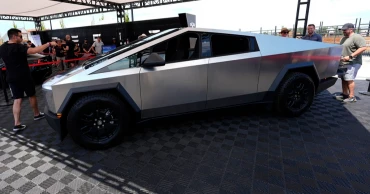
5th recall for Tesla Cybertruck within a year, the latest due to rearview display
Tesla is recalling more than 27,000 Cybertrucks because the rearview camera image may not activate immediately after shifting into reverse, the fifth recall for the vehicle since it went on sale late last year.
Tesla has released a free software upgrade to address the issue and owner notification letters are expected to be mailed Nov. 25.
Cybertruck owners have had to deal with a series of recalls since the vehicle went on sale in November. In June, there was a recall to fix problems with trim pieces that can come loose and front windshield wipers that can fail. Two months before that, some Cybertrucks were recalled because the accelerator pedal could stick.
In the most recent recall, the company notified the National Highway Traffic Safety Administration that the display screens in effected trucks may remain blank for up to 8 seconds after a driver shifts to reverse. The U.S. requires those screens to activate with a rearview within 2 seconds of shifting into reverse.
Elon Musk's Tesla delivered the first dozen or so of its futuristic Cybertruck pickups to customers in November, two years behind the original schedule.
Owners may contact Tesla customer service at 1-877-798-3752 or the National Highway Traffic Safety Administration Vehicle Safety Hotline at 1-888-327-4236 or go to www.nhtsa.gov.
1 year ago
Microsoft Copilot adds ChatGPT-like features
Microsoft has introduced a significant overhaul to its AI-powered assistant, Copilot, unveiling a host of new features designed to enhance user experience and productivity.
These include Copilot Voice, Think Deeper, and Copilot Vision, which collectively bring a more personalised and interactive touch to the AI platform. Alongside these functional improvements, Copilot is also getting a fresh new look, adopting a more user-friendly interface.
The newly introduced features aim to position Microsoft Copilot as a robust and versatile tool for daily tasks, competing directly with other AI platforms like OpenAI’s ChatGPT and Meta’s voice features.
According to Mustafa Suleyman, CEO of Microsoft AI, “Copilot now looks unlike anything I’ve seen from Microsoft before, with an interface that is a big departure from what exists right now. It’s a lot warmer, with a personalised Copilot Discover page that’s more useful and inviting than a text entry prompt for a chatbot.”
How to Detect an AI-generated Image
Key Features of the New Copilot
Copilot Voice: This feature brings voice interactivity to the AI, making it more convenient to use on the go. Users can brainstorm ideas, ask questions, or simply converse with Copilot using natural language. With four different voice options to choose from, the voice experience can be customised to suit individual preferences.
Think Deeper: Inspired by OpenAI’s o1 model, this feature enables Copilot to provide more nuanced and detailed answers to complex queries. Taking additional time to respond, Copilot can now reason through challenging questions step-by-step, making it ideal for users who require in-depth comparisons or detailed explanations.
Copilot Vision: A groundbreaking feature that allows the AI to ‘see’ and understand text and images displayed on the user’s screen. This capability enables Copilot to provide real-time suggestions, assistance, and contextual answers without interrupting the user’s workflow. For example, it can help users decorate a new apartment by suggesting colour schemes and furniture arrangements based on the images and text viewed during a browsing session.
Copilot Daily: Aimed at reducing information overload, Copilot Daily provides a concise summary of news and weather in the user’s preferred Copilot Voice. Partnering with reputable content providers like Reuters, Financial Times, and the USA TODAY Network, the feature ensures that users start their day informed and prepared, with the ability to set reminders for upcoming events.
Personalised Discover: This feature serves as a gateway to the various capabilities of Copilot, helping users explore the tool's functionalities through tailored conversation starters and guides. The personalised suggestions evolve over time based on the user’s interactions across Microsoft services.
Google falling short of important climate target, cites electricity needs of AI
A Fresh Look for Copilot
The latest update isn’t just about new functionalities — Microsoft is also redesigning Copilot’s interface across mobile, web, and its Windows app. The new design embraces a more card-based user experience, providing a cleaner and more organised way to interact with the AI.
The homepage, now named the Copilot Discover page, is customisable based on the user’s conversation history and preferences.
With these updates, Microsoft is setting a new standard for AI-powered assistants, integrating voice, vision, and deeper reasoning capabilities. As AI technology continues to evolve, Copilot is poised to become an indispensable tool for both personal and professional use, offering a richer and more personalised interaction model for its users.
About Microsoft Copilot
Microsoft Copilot is an AI-driven assistant designed to improve productivity across the Microsoft ecosystem. The latest enhancements bring new capabilities such as voice interaction, advanced reasoning, and visual recognition, making it a versatile companion for everyday tasks.
1 year ago